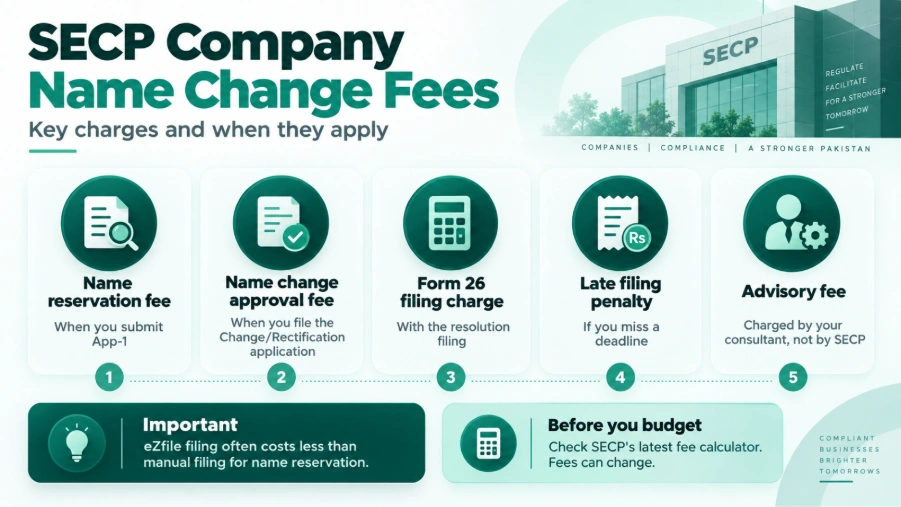
Filing online through eZfile usually costs less than filing manually for the name reservation fee. The name change approval fee is separate from that reservation charge. Form 26 also carries its own statutory fee. Regulated companies may also face extra NOC-related costs.
SECP updates its fee schedule from time to time. So, check the current figures on SECP’s own fee calculator before you budget for the process.
How Long Does It Take?
SECP doesn’t guarantee a fixed timeline. So, treat any exact number you see online with caution. Speed depends on a few things. How quickly does your name get approved? How fast can you pull your documents together? How thorough is SECP’s review? Do any NOCs or observations slow things down?
The most common causes of delay are simple. Incomplete documents. Inconsistent spelling of the new name across your paperwork. Missing affidavits. NOCs that haven’t come through yet.
SECP has offered faster processing for certain filings in the past. Do you want to know whether a fast-track option currently applies to name changes? It’s best to confirm this directly with SECP or your advisor.
Common eZfile Problems
My company isn’t showing up in eZfile. This usually means your account isn’t correctly linked to your company profile. Or your filing authorization isn’t set up properly. Check your user role first. Still stuck? Contact SECP’s CRO helpline.
I can’t find the Change of Name option. This option appears only after SECP reserves your proposed name. Don’t see it? Go back and complete App-1 first.
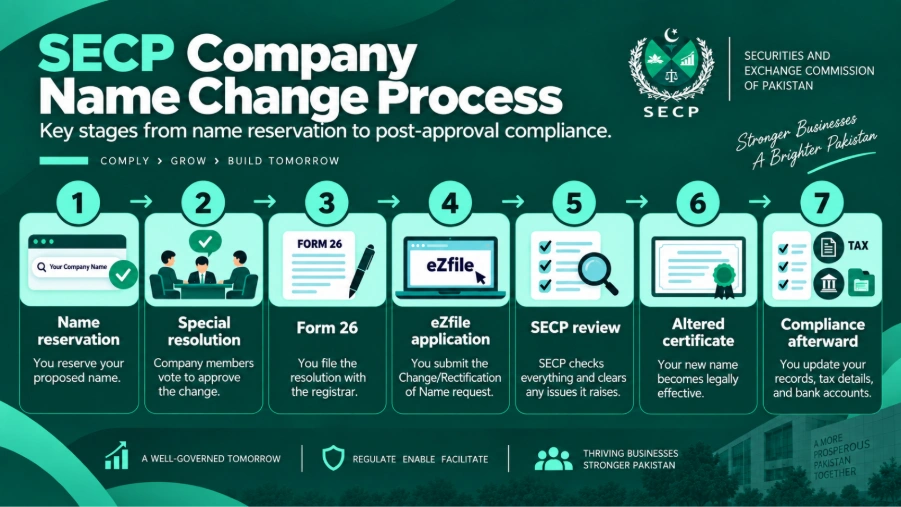
My name is reserved, so why hasn’t it changed yet? This is the most common mix-up in the whole process. Reservation only holds your name. It doesn’t change it. You still need the resolution, Form 26, the Change/Rectification filing, and the altered certificate before your new name becomes official.
What if my name reservation expires? A reserved name only stays held for a limited period under the Companies Act, 2017. Does that window close before you finish the process? Then you’ll likely need to reapply. Check the current reservation period on SECP’s portal, since it can change.
If SECP Raises an Observation
An observation means SECP spotted a gap or mismatch somewhere in your application. You need to fix it before SECP can approve the change. This is a completely normal part of the process. It’s not a rejection.
Why does SECP raise one? A few common reasons: missing documents, a resolution that doesn’t clearly state the proposed name, a mismatch with your amended MOA or AOA, an incomplete affidavit, a missing NOC, incorrect data, or a payment issue.
Want to fix it? Look closely at exactly what SECP flagged. Prepare the correction. Upload it against the same application, then resubmit. Responding quickly keeps your overall timeline shorter.
You usually don’t need to start over. Most observations only require fixing the flagged issue. There’s one exception, though. Was your resolution fundamentally flawed, or has your name reservation expired? Then part of the process may need redoing.
If SECP Rejects Your Proposed Name
A rejected name usually comes down to one of three things. It’s too close to an existing company name. It uses a restricted word, or it implies a government tie your company doesn’t have.
Here’s the good news: you can submit a fresh App-1 with a different name. There’s no real limit on how many times you can try. Just know that each attempt carries its own fee.
Do you genuinely believe SECP’s rejection was wrong? You can pursue SECP’s internal review or appellate options under the Companies Act, 2017. Confirm the exact appeal deadline directly with SECP. Regulations set these timelines, and they can change.
After SECP Approves Your New Name
Getting the certificate isn’t quite the finish line either. You still have some follow-up work to do, and keeping on top of it is exactly the kind of ongoing task covered by statutory compliance services.
The 90-Day Former Name Rule
Section 13 of the Companies Act, 2017 covers this. Your company must display its former name alongside the new one. Do this for ninety days from the date SECP issues the certificate.
This rule doesn’t apply to an SMC or a private company. The exception? If that company is a public interest company, or a subsidiary of a listed company.
Update Your Tax and Bank Records
Your legal name on FBR records must match your updated SECP registration. But this update doesn’t happen automatically. Confirm the exact documents FBR needs directly with them, a step our guide to tax filing in Pakistan also touches on for ongoing FBR record accuracy.
Your bank will also ask for the altered certificate. They use it to update your KYC records under the new name. Start this early, since banks can take a while to process it, and our financial consultancy services can help coordinate this alongside your other financial updates.
Update Everything Else
Replace your letterheads, invoice templates, stamps, and signage. You can still use up any old stock while the 90-day rule applies. You’ll also need to update your website, email signatures, payment gateway details, and any online listings, so they match your new legal identity, work that often runs alongside broader outsourced accounting support once invoicing templates and records need reissuing.
Don’t forget any sector-specific licenses or registrations tied to the company. You’ll need to update these with the relevant regulator too.
Does a Name Change Affect Contracts or Debts?
No, and this is genuinely reassuring for most business owners. A name change doesn’t erase, transfer, or reset any of your company’s existing duties.
Contracts signed under your old name stay enforceable. Why? Because the company itself hasn’t changed, only its name has. It’s still good practice to notify the other parties and update references going forward.
Outstanding debts and liabilities carry forward exactly as they were. Just make sure to notify your lenders, so their records stay accurate. Court cases and legal proceedings continue against the same company too. They reflect the updated name from that point on.
Does It Affect Your NTN, CUIN, or Bank Account?
Your CUIN (Corporate Universal Identification Number) stays the same. Why? Because your company is still the same registered entity. Your NTN generally doesn’t change either. A name change doesn’t make you a new taxpayer, in the same way SECP, FBR, and NTN registrations are treated as one linked set of records for freelancers and startups registering a business in Pakistan. You will still need to update the name on FBR’s record, though, so check the exact steps directly with FBR.
You typically won’t need a new bank account. Most banks update the account name and KYC details. They usually don’t ask you to open a new account, though this can vary slightly by bank.
What to Do Next
Haven’t picked a new name yet? Start with SECP’s availability check and a quick trademark search before you commit.
Is your name already reserved? Move straight into drafting your special resolution before that reservation window closes.
Are you drafting the resolution right now? Make sure it clearly names both your current and proposed company names. It should also name someone to handle the SECP filings.
Stuck inside eZfile? Check that your account is properly linked to your company first, before assuming something’s broken.
Has SECP raised an observation? Respond to the exact point it flagged, rather than resubmitting your whole application.
Is your application already approved? Then your priority now is the ninety-day former name rule, your FBR updates, and your banking KYC. Don’t just file the certificate away and forget about it, and if this change is part of a wider rebrand or restructuring, our business development consulting team can help you plan the transition properly.
If you want professional support with the process, PFOC can assist with name reservation, resolutions, Form 26, eZfile filing, SECP observations, and post-approval compliance. Contact PFOC for clear guidance based on your company’s situation.