
Company Name Reservation in Pakistan | SECP Name Reservation
Request a Free Quote

Introduction
You picked a name. You searched it online. Nothing came up. You paid the fee and applied. Then SECP rejected it.
This happens a lot. A name that looks unique to you might be “too similar” by SECP’s rules. The portal won’t always tell you why. And your fee doesn’t come back.
Most guides skip this part. They walk you through the steps but don’t warn you about the traps. This guide covers both.
What Company Name Reservation Means
Name reservation is the first legal step in company registration in Pakistan. You can’t file your company papers until SECP has approved a name for you.
It’s not just admin. A reserved name gives you sole rights to that name during the process. No one else can claim it while it’s reserved to you.
SECP handles this through the eZfile portal. It replaced the old eServices system in 2024. If you’ve seen guides that mention a different portal, those guides are outdated. If you’re just getting started, our full guide on how to start a business in Pakistan covers the bigger picture before you dive into this step.
How to Reserve a Company Name: Step by Step
Reserve Your Company for Name with Confidences
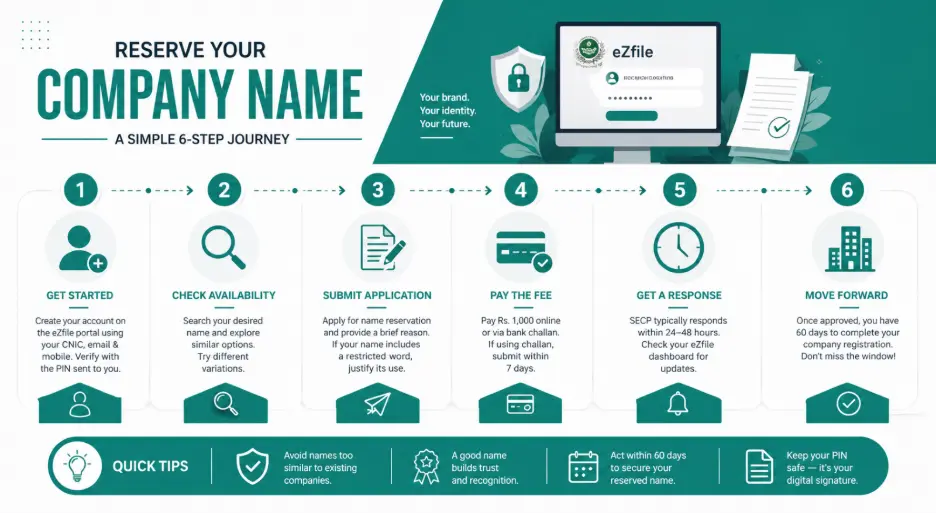
Here’s the actual process on the current eZfile portal.
Step 1: Create your eZfile account.
Go to SECP’s eZfile portal and sign up. You’ll need your CNIC, email, and mobile number. You’ll receive a PIN via SMS. This PIN works as your digital signature going forward.
Step 2: Search the name.
Use the search tool to check if your name is taken. Look for close matches too. Try several versions.
Step 3: File the application.
Select “Name Reservation” from your dashboard. Enter your name and write a short reason for choosing it. If your name has a restricted word, explain why it should pass. Use this field for that.
Step 4: Pay the fee.
Pay Rs. 1,000 online or get a challan for bank payment. If you pay by challan, you have seven days to submit it.
Step 5: Wait for a response.
SECP usually responds within 24 to 48 hours. You’ll see a notice in your portal.
Step 6: Proceed to company formation.
Once approved, you have 60 days to file your company papers. If you miss that window, the name expires and you’ll have to start over.
What Most People Don’t Know Before They Apply
Most people treat company name reservation like a domain name check. They search for the exact name. Nothing shows up, so they assume it’ll pass.
SECP doesn’t work that way. The rules go beyond exact matches.
Your name can be rejected for sounding like an existing one. That means “Alpha Tech” might get blocked if “Alpha Tech” is already taken. Adding “The” in front won’t save you. SECP looks at the full picture, not just the spelling.
This catches a lot of people off guard. They search, find nothing, apply, and still get a rejection notice. Knowing this upfront saves you real money.
Why Name Rejection Costs You More Than You Think
The fee is not returned. Each application costs Rs. 1,000. If your name is rejected, that money is gone.
If your backup name also fails, that’s another Rs. 1,000 gone. For a small business just starting out, this adds up fast.
It also costs you time. Every rejection adds days to your process. You have to rethink the name, redo the search, refile, and wait again.
Picking the right name before you apply matters a lot. It’s not just about branding. It’s about not losing money on failed applications.
Names SECP Won’t Approve
SECP has a list of banned and restricted words. Some are fully blocked. Others need proof or special approval.
Restricted words include: Government, Federal, State, Authority, National, Islamic, Bank, Trust, Fund, Exchange, and Modaraba. All of these need special permission. Adding “Pakistan” as a prefix or suffix also needs a reason.
You can’t just put “Pakistan” at the start of your name to sound official. You need a valid reason and SECP needs to agree with it. The same goes for names that hint at a government or global connection.
There’s also a spelling rule that catches many people. SECP only accepts correct dictionary spellings. Misspell a word on purpose and your name gets rejected. “Konnect” instead of “Connect” won’t pass.
The Good News: The Pakistan Rule Got Easier
In February 2025, SECP released updated naming guidelines. One change: the rules around using “Pak” or “Pakistan” in a name were relaxed.
This is good news for brands that want to include Pakistan in their name. The old rules were stricter. The new rules give more room. Just don’t use it to look like a government body.
These 2025 guidelines replaced the old FAQ page on SECP’s website. SECP now has a clear document covering naming rules. It lists tips for names that are likely to pass. It also covers how to appeal a rejection. Worth reading before you apply.
How to Check Name Availability
Before you apply, use the free name search tool on SECP’s eZfile portal. It checks registered and pending names.
Don’t just search the exact name. Search the core word too. If your name is “Horizon Tech Solutions,” also search “Horizon” alone.
Make a list of two or three backup names before you start. You can only submit one name per application. Having backups ready means you can refile fast if your first choice fails. For a complete walkthrough of what comes after name approval, see our company registration in Pakistan expert guide.
The SECP Company Name Reservation Fee
The current fee is Rs. 1,000, effective from November 2024. Some older articles still quote Rs. 200 or Rs. 500. Those figures are outdated.
One source from late 2024 confirmed this change. Always check the SECP website for the latest fee before you apply. Fees have changed before and can change again.
The fee is not refunded. It doesn’t matter if your name is rejected. You don’t get the money back. This makes it even more important to do your name research first.
You can pay through the eZfile portal with a debit or credit card. Or you can pay at a bank using a challan. If you use the challan route, submit it within seven days. Miss that and your application gets rejected.
There’s also a small one-time fee when you first create your eZfile account. It’s separate from the name fee and only applies once.
What Happens If Your Name Is Rejected
You’ll get a rejection notice in the portal. It should include the reason for the rejection.
You have two options. You can apply again with a new name and pay the fee. Or you can file a formal appeal if you believe the rejection was wrong.
SECP’s 2025 guidelines introduced a clear appeal process. This is new. Before February 2025, there was no formal way to challenge a name rejection.
If you do appeal, be prepared. A vague appeal won’t get far. Show why your name doesn’t conflict with the one SECP flagged.
The Combined Route: Name and Incorporation Together
SECP lets you file name reservation and company formation at the same time.
This is faster. You don’t have to wait for name approval before starting your formation papers. If the name is approved, the rest of the process moves forward right away.
Not everyone is ready to do both at once. If your documents are ready and your name is clearly unique, this route saves a lot of time. You could finish in 3 to 5 working days total.
What the Portal Finds vs. What SECP Reviews
The eZfile search tool checks the database for exact and close name matches. But the reviewer who processes your application can catch things the tool misses.
They look at phonetic similarity. They look at the overall feel of the name. They consider whether the name could mislead someone about what the company does.
The search tool is a filter. The real review goes deeper. A clean search result is a good sign. It’s not a promise of approval.
SECP Name Search vs. Trademark Search
These two are different things. The SECP name search only looks at company names registered or pending with SECP.
It won’t show you trademarks. It won’t show you brand names used by sole proprietors or partnerships. It won’t catch names used outside the SECP system either.
Do both searches before you settle on a name. Even if a name passes SECP’s check, someone else may use it as a brand. That causes problems later. For brand protection after incorporation, you’ll need to file a separate trademark. PFOC’s trademark registration legal services cover that process fully.
Company Name Reservation vs. Trademark Registration
These two get mixed up often. Reserving a name with SECP protects you only within the SECP system. No other SECP-registered company can use that same name.
It does not protect your brand. For brand protection, file a trademark with the IP Organisation of Pakistan. That’s a separate process handled by a different government body.
Your brand name matters. Trademark registration is the next step after company formation. Your SECP name reservation doesn’t give you brand protection.
Documents You’ll Need
Name reservation itself needs very few documents. You need your CNIC or passport, a working email, and a mobile number. That’s it for name reservation.
The heavier paperwork comes at the formation stage. You’ll need the Memorandum of Association, the Articles of Association, and details for all directors and shareholders.
After your company is incorporated, FBR registration is the next required step. Our FBR NTN compliance Pakistan guide covers exactly what to do once you have your Certificate of Incorporation.
Who Can Apply
Any Pakistani national with a valid CNIC can apply. Foreign nationals can use a passport. You don’t need to be in Pakistan to apply. The whole process is online.
This matters for overseas Pakistanis and foreign investors. You can register without being in Pakistan. You can handle everything from abroad via the eZfile portal.
One Thing Many Guides Still Get Wrong
A lot of older guides tell you to submit three names in one application. That was how the old eServices system worked.
Under the current eZfile portal, you submit one name per application. If rejected, you file again with a different name. And pay again.
This is why having backup names ready matters so much. You’re paying per application, not per name in a batch. Have a ranked list of three names ready before you apply. That way, you’re not stuck after a rejection.
What to Look for in a Good Company Name
A good name is unique and spelled right. It doesn’t use restricted words without a reason. And it can’t sound like any existing company.
Descriptive names with generic words tend to fail more often. Names that are too close to known brands also fail. Misspellings always fail.
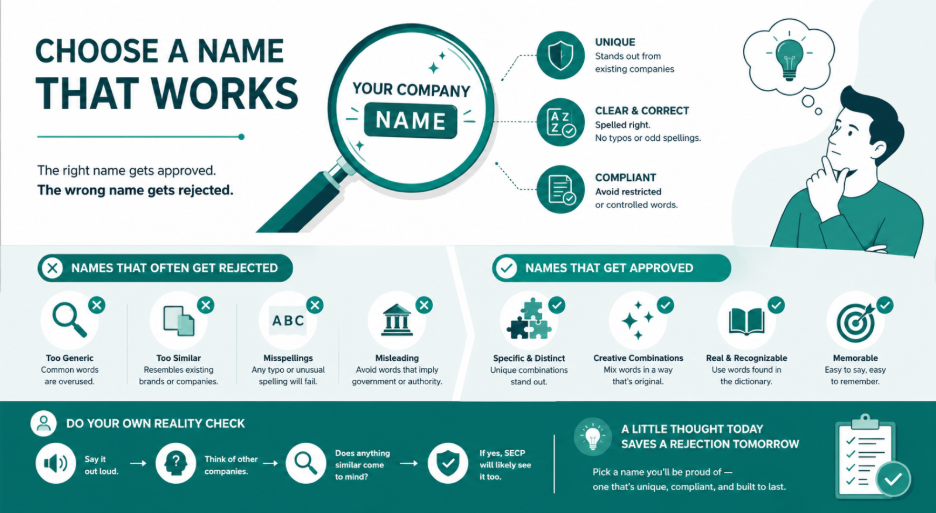
Names that work tend to be specific. They combine two or more words in a way that makes the mix unique. They don’t try to sound official or governmental. And they’re spelled the way you’d find them in the dictionary.
Before you apply, say your chosen name out loud. Think of other registered companies. Does anything close come to mind? If you can spot a clash yourself, SECP will too.
How Long the Whole Process Takes
Name reservation: 24 to 48 hours for SECP to respond after you apply.
Full company formation after name approval: 2 to 5 working days for a standard private limited company. That assumes your documents are correct.
Mistakes, rejections, or a missed challan deadline all add time. Done right, the combined route gets you a Certificate of Incorporation in 3 to 5 working days.
Conclusion
If you need help with SECP name reservation or the full company formation process, PFOC offers business setup support in Pakistan. That includes help for overseas Pakistanis and foreign investors who can’t be here in person.
Note: SECP fees, portal features, and naming guidelines do change. Always confirm the latest details directly on the SECP website or with a consultant before you apply.
FAQS
No. SECP considers how names sound, not just how they’re spelled. A name that sounds like an existing one will likely be rejected.
No. The Rs. 1,000 fee is non-refundable regardless of the outcome.
60 days from approval. You must file your company formation documents within that period or the name expires.
No. SECP name reservation is only for private limited, single member, and public limited companies. Sole proprietors register with FBR and local bodies.
Yes. The process is fully online. Foreign nationals and overseas Pakistanis can apply using their CNIC or passport.
The name expires. You’ll need to apply again and pay the fee again.
For a standard Pvt Ltd or SMC with minimum capital, expect around Rs. 2,200 to Rs. 2,500 in government fees for online filing. Use SECP’s fee tool for exact figures based on your capital amount.
Not strictly. You can do it yourself on eZfile. If you’re unsure about the rules, a consultant can review your name first. That can save you a failed attempt and the fee.
Yes. SECP’s 2025 guidelines introduced a formal appeal process. State clearly why your name doesn’t conflict with the one SECP flagged.