


The Federal Board of Revenue (FBR) requires the Integrated Revenue Information System (Iris 2.0) to act as the sole portal for the filing of Income Tax Returns (ITR) for all taxpayers filing ITRs in Pakistan. This portal is the first step for the FBR to undertake complete online filing and is the first step in the Digital Pakistan initiative. The IRIS 2.0 system supersedes and consolidates all legacy systems and serves as the sole portal from which all taxpayers will electronically file (e-file) their returns.
New and old taxpayers alike can consider e-enrollment on the IRIS Portal as their only e-registration. After e-enrollment as a taxpayer, a person, company, or Association of Persons (AOP) receives an NTN or Registration Number and a password, and the taxpayer is then digitally recognized. All taxpayers must use the Portal; this reflects the FBR’s policy of requiring complete digital compliance in all aspects of taxpayer engagement, from registration to payment, and subsequently, filing refund claims.
The Finance Act 2024 amended the Income Tax Ordinance, 2001, introducing E-Commerce Taxation Regulations, focused on Digital Economy Expansion and Punitive Non-Compliance. These Changes drastically transform the landscape for Tax Year 2025.
An important step forward is the creation of a separate tax regime for e-commerce, enabled by new charging provisions in section 6A. This ensures that every payment for the supply of goods and services ordered electronically is subject to tax, whether facilitated through an Online Marketplace (OMP) or a proprietary website. The collection mechanism prescribes third-party withholding as collection at source. Intermediaries such as banks, financial institutions, authorized foreign exchange dealers, and payment gateways must withhold and remit income tax (Withholding Tax) on receipts exchanged with the seller.
For transactions of Cash on Delivery (CoD), the couriers must remit a higher WHT on receipts. This discrepancy between WHT on digital (1%) and cash (2%) transactions indicates a clear intention of the authorities to provide a financial incentive to adopt digital payment systems and to expedite Pakistan’s move towards a cashless economy.
The FBR shifts the collection and compliance burden to the large corporate intermediaries (banks and couriers), thus ensuring a seamless digital transaction audit trail for field auditless compliance. Also, new Online Marketplaces are subject to new compliance obligations of Rule 38A of the Income Tax Rules, 2002, as significant reporting regulations are introduced. The tax collection under these new provisions is deemed a final tax according to Section 6A on income earned by the seller from domestic and exported e-commerce transactions.
Widening the gap between the previous and current
Non-filers can expect considerable increases to the penalties they will incur for non-filing. This has led to a greater emphasis on mandatory inclusion in the Active Taxpayer List (ATL). Taxpayers not listed on ATL who withdraw more than Rs. 50,000 in cash in one day will face a higher tax rate than before, a rate of 0.9 per cent. Individuals and businesses that operate in the undocumented economy will feel the effects of this rate the most. This increase in tax rate serves as an economic disincentive but also forces undocumented cash flow transactions to become voluntary. This will force a movement of a taxpayer from a non-filer status to an active filer status. This approach forces compliance from the economically rational non-compliant taxpayer and brings them into the system to pay taxes, even at a punitive rate.
Definition and impact of the status
To access certain important economic benefits, individuals must maintain an active filer status. This is someone who submits their income tax return by the FBR deadline for this case’s primary income tax return. For most individuals and AOPs, the deadline for Tax Year 2024 was September 30, 2024; however, for Tax Year 2025, the deadline is September 30, 2025, while companies with a financial year ending June 30 must submit by December 31.
If a taxpayer does not achieve or maintain ATL status, they endure consequences regarding tax filing and taxes on capital transactions, such as property and vehicle purchases. A taxpayer should be aware that non-filers pay more tax and that they will be considered ineligible for tax refunds.
A taxpayer is categorized as a Late Filer who is not completing their filing tasks by the deadline. This categorization of taxpayer, Late Filer, can attain ATL status as an Automatic Late Filer by paying the required ATL surcharge. For an individual, this fee is 1000 rupees, while for companies it is Rs. 20,000, and for AOPs it is Rs. 10,000. An important consequence of late filing for taxpayers is regarding tax refunds. Tax law requires a taxpayer who files a tax return after the required due date to not be allowed to receive a refund for the period that they remain outside of ATL. Ultimately, the tax law adds more complexity and consequences to the already existing surcharges by preventing the taxpayer from engaging in cash flow planning.

2.1. Prerequisites and Documentation Checklist for New Individuals
Before completing any online registration on IRIS, prospective taxpayers will need certain digital and physical prerequisites to help streamline their e-enrollment.
Digital Identity
The FBR has implemented a unique ‘single source of truth’ identity linkage. The individual must own a mobile device with a SIM that is registered against their CNIC, ensuring a direct ownership linkage for security purposes. A single personal email account is also a requirement.
The registration application requires you to upload certain documents that are to be in scanned PDF format:
A certificate proving that you maintain a personal account in a bank of your own. Also, if you partake in business activities, you must provide proof of tenancy or ownership of the business premises.
A business premises utility bill that is no older than three months.
The requirement for identity verification (CNIC, Mobile SIM, Bank IBAN) is that, in the event that digital linkages are fractured or absent, physical presence and documentation will be required at the designated Regional Tax Office (RTO) during registration or future modifications.
The additional documentation required to verify the existence and location of your enterprise is also required for individuals with business income. Operational documents must be submitted, which include original proof of tenancy or ownership of the business premises, as well as a utility bill (one that is not older than three months) to confirm operational status.
Pakistani emigrants must undergo e-enrollment using a passport, a valid NID (National ID), or a NICOP. A valid email account and phone number are mandatory to receive the verification code that needs to be input. If registration is done electronically, the taxpayer is assigned an NTN, which is the number used primarily to identify the taxpayer when returns are filed. Those overseas have also provided the income exemption and must provide remittance documents sent to Pakistan to allow the correct adjustment of the overseas taxpayer’s wealth statement.
Taxpayers are required to e-enroll if they already have an NTN and do not have the IRIS credentials. This activity requires the taxpayer to access the IRIS portal and login credentials and select. This option assigns the existing NTN to the user, enabling access to the IRIS portal.
The registration process includes a Multi-Factor Authentication (MFA) sequence to secure the account.
OTP Verification: Users should authenticate their accounts by submitting one of the two verification codes sent to their email and phone number.
Credential Setting: After authenticating via the OTP, the user creates a new customized Password and confirms their new Password to complete the update.
PIN Setting: The user needs to set and verify a 4-Digit PIN. This specific PIN will remain important as it serves as the user’s digital signature for submitting and signing all future tax declarations and other regulatory submissions.
Registration should take place seamlessly within the system; however, it does not operate as intended due to a system dependency issue. An NTN holder is unable to complete a tax return during their initial system login until their registration application has been completed and processed.
The taxpayer is then required to click on the Submit button to send their registration application. This action causes IRIS to transfer the task into the Completed Task folder. After a short pause, usually five minutes, the taxpayer should check for the file titled “181 (Order to grant/register application).” This document serves as the last order, and once completed, the NTN is considered fully operational within IRIS 2.0, allowing additional submissions to be made for various filings. A failure to await or verify the processing of Form 181 is the root cause of the frequently encountered “Task Not Enabled” error, as taxpayers’ foundational metadata must be completed before any legally required filing is allowed.
To access IRIS 2.0, the users first enter their National Tax Number (NTN) or Registration Number, and password into the system’s first screen. The landing page is the principal navigation and access point for all IRIS 2.0 services and supports all integrated service offerings. Taxpayers can access the portal link to the service’s YouTube page for educational assistive content, including training or instructional videos.
It is not uncommon for taxpayers to forget, or even forget their IRIS password and/or 4 Digit PIN credentials, which is even more commonplace during tax filing periods. The IRIS system is structured to provide a secure, quarantine/multi-step validation system.
Stage 1 Initiation: The taxpayer must select the “Forgot Password” link, which guards access to someone’s account from lost credentials.
Stage 2 Identification: The user must provide a verification credential to the system. They specify their CNIC or Registration Number, which is automatically determined to be related to the NTN.
Stage 3 Verification: Confirmation or Recovery is accomplished by the system sending a One-Time Password (OTP) to the registered user’s mobile phone or email account.
Stage 4 Completion: When all flows are correct to the user, the system must grant the user the ability to create a new password and to set a new four-digit password.
Use the FBR helpline 051 111 772 772 with email support if OTPs are consistently delayed.
A taxpayer facing password recovery with no access to their registered email and registered mobile number poses a line challenge. In the recovery options of the IRIS system, the mobile number registered against the CNIC can be updated. However, the registered email address cannot be updated, and this is a major roadblock. The critical factor here is distinguishing between data fields systemically controlled by the RTO that can be changed on the user’s behalf and the fields that are changed by the user themselves in self-service mode.
Mobile phone number changes according to the self-service policy (Registration Form 181) are under the already logged-in user. Changing the email address is a mandatory RTO visit, however. Thus, where the taxpayer has lost access to the registered email, which is critical since FBR corresponds with the taxpayer via that email, recovery of the account is predicated on in-person identity validation at the RTO. This is to secure the communication channel against unauthorized modifications to taxpayer identification and official correspondence.
3.4. Changes to Profile Details, RTO and IRIS Self-Service Changes
In updating registration information with the FBR, there are differences in the updating of basic operational data as opposed to high-risk changes to identity data, which require different protocols.
Taxpayers are allowed to modify operational data that is less sensitive by applying for Registration Form 181 (modification) after logging into the IRIS system. Such data includes the following:
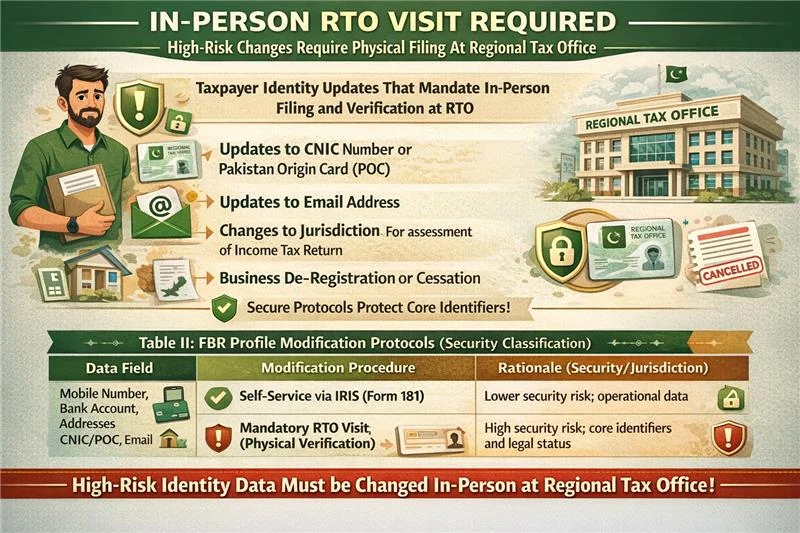
Changes to the primary identity, legal category, or jurisdiction of the taxpayer require in-person filing of the appropriate documents at the Regional Tax Office (RTO). Such changes are high-risk, including:
This system protects sensitive information by neutralizing the ability to modify existing high-risk identity data. Such information includes CNIC and Email, and the changes are subject to in-person verification of legal identity reason changes.
Table II: FBR Profile Modification Protocols (Security Classification)
Income tax is on your profit. Withholding tax is what you deduct when paying others (salaries, vendors). Sales tax is collected from customers and paid to the government through periodic returns. Stylistics. Ensure that the hyperlink is active, as this sentence is currently just a text-based cross-reference.
A retail company was selected for a desk audit. They lacked the organised tax documentation that Pakistani companies are required to keep. PFOC stepped in to digitise their last three years of invoices and reconciled their sales tax returns with their annual income tax filing. We represented them before the FBR, and the audit was closed with zero tax demand.
“PFOC transformed our messy paperwork into an audit-proof system. Their representation gave us the peace of mind we needed.”
— Faisal M., Operations Director.
| Data Field | Modification Procedure | Rationale (Security/Jurisdiction) |
|---|---|---|
| Mobile Number, Bank Account, Addresses | Self-Service via IRIS (Form 181) | Lower security risk; operational data. |
| CNIC/POC, Email Address, Jurisdiction, Deregistration | Mandatory RTO Visit (Physical Verification) | High security risk; core identifiers and legal status. |
Having the correct and appropriate documentation available beforehand is necessary to ensure the e-filing process is efficient and the likelihood of discrepancies resulting in a flag of the Compliance Risk Management (CRM) systems is minimized. These documents should include:
Identification and Income: CNIC or NTN Number, a Salary certificate (only applies to employees), and the Profit and Loss Statement (only applies to those operating a business).
Taxes Paid: Each WHT certificate, the types of which are obtainable from banks, telecom, and employers.
Assets and Liabilities: Documentation of rental agreements, proof of ownership of property, documentation of any investments, bank signatories, and utility bills for any properties or businesses.
Deductions: Any documentation about Zakat, donations, insurance, or pension contributions, if any, is applicable.
For ease of compliance, the Beverley Federal Revenue (FBR) issues a Form 114 (I) for salaried employees who have a salaried income that is greater than 50% of their income.
Entering Data and Navigation in IRIS
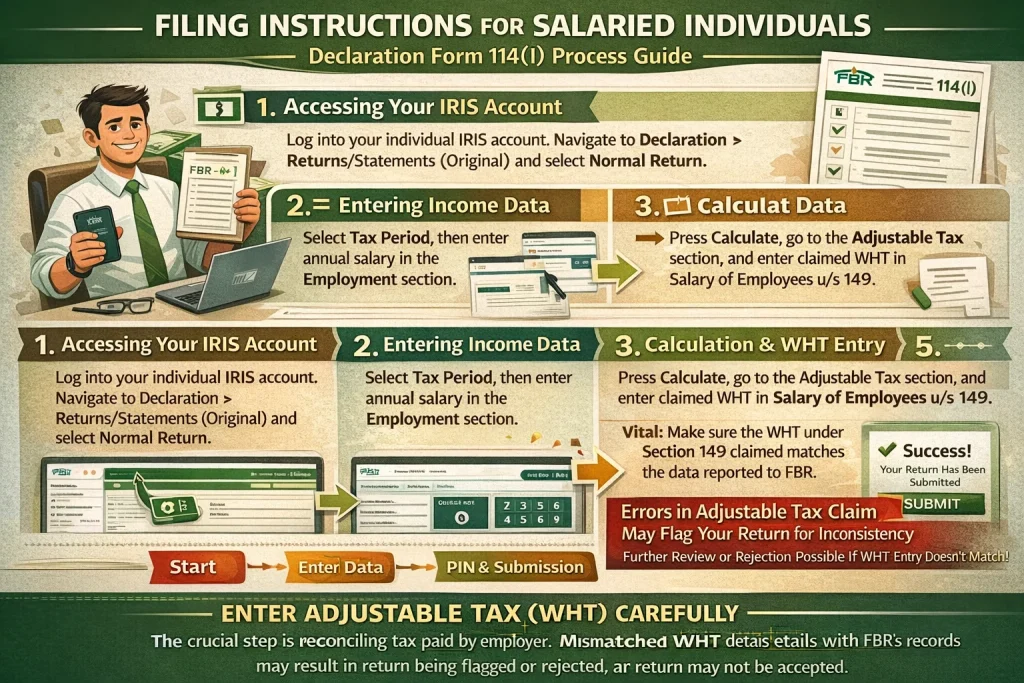
Accessing the Return: Each Taxpayer is to log into their individual IRIS account and then navigate to the Declaration tab, from there select Returns/Statements (Original), and then select the option titled Normal Return.
Entering Income: Each taxpayer should enter their Tax Period and then select the Data tab to continue.
In the Employment section, the annual salary is populated under Pay, Wages, or Other Remuneration (including Arrears of Salary).
Calculations and WHT Convergence: Upon pressing the Calculate button, the taxpayer proceeds to the Tax Chargeable/ Payments section and chooses “Computations” to see the calculated “Admitted Income Tax” The important step is reconciling the tax already assumed to be paid by the employer, and this is done by going to the Adjustable Tax section and entering the claimed WHT in “Salary of Employees u/s 149,” and this must change the tax liability from Withholding Income Tax to the other column.
Submission: The process is finalized by entering the required 4-digit PIN to authenticate the action and pressing the Submit button.
The proper and exact entering of the Adjustable Tax (WHT) is the most important step. If the WHT claimed under Section 149 does not match the WHT data reported to FBR by the withholding agent (the employer), then the system is likely to flag the inconsistency, and the return may not be accepted at all unless the inconsistency is removed.
The Income Tax Ordinance, 2001, presents business filers with a more sophisticated challenge due to income reporting across the five primary classifications.
Specialized Data Tabs
Business filers, unlike individual taxpayers, are able to use specialized tabs in the system in addition to the basic income categories to conduct more detailed accounting. These tabs are detailed.
Amortization and Depreciation: These sections are necessary to allocate and to allow a deduction to be taken for the cost of both intangible and tangible assets over the course of their respective depreciation periods.
Minimum Tax: For business filers, there are legal provisions that establish a minimum taxation amount that must be calculated and reported, irrespective of the standard tax.
Option out of PTR (Presumptive Tax Regime): This specific tab is designed to facilitate particular scenarios where a taxpayer chooses to opt out of the presumptive tax regime.
The official deadline for any individual and AOP is September 30, 2025, but the deadline for company returns is typically a later date, usually December 31, 2025. However, the taxpayers concerned must stay alert for an official extension from the FBR.
The filing of a Wealth Statement that shows a taxpayer’s assets and liabilities, both domestic and foreign, is compulsory for certain taxpayers. Assets that may be included are gold, vehicles, property, and cash, whereas liabilities include loans. In this Wealth Statement process, there are concerns about whether there is a gross accounting of how there is a positive or negative change in a taxpayer’s Wealth (Assets minus Liabilities) in relation to how it is in the Income Report (ITR), both Taxable Income and Exempt Income. The regulatory concerns about these reconciliations are high, as unexplained increases in wealth are the main focal points to start risk-based FBR audits and inquiries.
One middle-level corporate employee based in Lahore, who was recently promoted to a higher grade pay (exceeding the taxable limit) had no idea about filing until he married someone out of his own office (having earned and saved since he started a career but still paid no heed or consideration to these matters ever before), they both together went out looking for an apartment scheme to invest in. On inspection, it was found that the property transfer withholding tax for a non-filer is 10% instead of 3% for an active filer.” The company’s victim immediately contacted Pakistan First Online Consultants (PFOC) for help. PFOC looked at the last 2 years’ income history, applied on NTN and filed back tax returns, and also guaranteed his name in ATL. Here, this amendment helped the client avoid an extra PKR 500,000 plus tax that he would have otherwise had to pay.
Client Quote: “I didn’t understand how expensive non-compliance was. PFOC took care of everything professionally and I saved a ton on my property purchase.
Following the inclusion of Section 6A, e-commerce business operators are now required to address and manage the reconciliation of WHT tax credits incurred by financial and operational intermediaries.
Business operators are required to segregate and record their total sales as follows:
Sales for which WHT tax credits begin (equation) are WHT’d at a financial/banking intermediary and settled electronically (e.g., payment gateways towards the seller’s bank account).
Sales for which WHT tax credits begin (equation) are WHT’d at a courier (i.e., Cash on Delivery) payment method.
Consider an Online Marketplace (OMP) seller as an example who will submit the Income Tax Return for TY 2025, reporting gross sales of PKR 4,000,000 from sales made within the country. In the interaction between Registered Agents and the FBR, it is noted that the FBR has internal documents showing that payment of PKR 5,000,000 has been made to the seller’s account and is based on the statutory returns submitted by courier service and payment gateway service providers under Rule 38A of the FBR Procedures.
The difference of PKR 1,000,000 between the reported income and the WHT reported by the compulsory WHT agents is flagged as high risk by the FBR. The seller is exposed to the risk of audit under sections 177 and 214C of the Income Tax Ordinance, 2001, which seeks to explain the difference between the WHT, which is not verified, and the income, which is reported. This is a good example of how the FBR is able to use 3rd party data on WHT to conduct more focused risk-based audits and expect greater adherence to the income reporting.
While it is the taxpayer’s responsibility to ensure that all applicable tax incentives are properly taken up, for Tax Year 2025, a case in point is the 25% tax rebate against tax payable for full-time teachers and researchers as provided under Clause (3A) of Part III of the Second Schedule of the Income Tax Ordinance. In order to benefit from these incentives, proper documentation and calculations as required for claims are necessary.
In case a taxpayer realizes that there are some errors after filing, there should be no panic. On the IRIS portal, there is a field for Revised Income Tax Return. \’ Revised Return\’ should be clicked in the Declarations tab. Correct the amounts that have been submitted. Verify that the amendment has been submitted before remitting.
Tax audit was also seemingly on the horizon for one of the online marketplace sellers, with FBR-yearly sales data looking greater than that declared in the income tax return. The variation came on account of a mismatch in the reconciliation of withholding tax collected by couriers and payment gateways. PFOC prepared a lengthy analysis establishing that third-party information matched the income reported and provided an amended return with supporting documentation. This due diligence action removed the audit exposure under Sections 177 and 214C, resulting in full compliance for the client.
Client Quote: “PFOC uncovered issues I didn’t realize existed. Their reconciliation work prevented a major FBR audit on me.” E-commerce Seller, Karachi
Electronic Claiming and Application
In order to claim a refund of income tax, it is a prerequisite that the initial Income Tax Return be filed electronically, as there is no qualifying mechanism for manual returns. The refund also needs to be quantified and highlighted in the electronic ITR. The taxpayer is also obligated to submit a different application that resides in the IRIS portal in order to claim the refund.
FBR has implemented the Centralized Income Tax Refund Office (CITRO) to process refunds in a more orderly fashion, and more often than not, taxpayers will receive refunds through an automated payment process that goes directly into the taxpayer’s bank account and can be expected in a matter of weeks. To be eligible to receive these payments promptly, taxpayers have the obligation to update their IRIS profile with their complete IBAN promptly. This IBAN, however, needs to match, without exception, the bank account information already presents in the IRIS profile.
Refund claims must be submitted within a two-year statutory time frame starting from the date of assessment (Submission of Returns) or the date of tax payment, whichever date occurs last. Although IRIS has the potential to provide some updates in the system under ‘Refund Status’, system functions tend to give false ability to preclude physical interaction with the Regional Tax Office (RTO) to inquire about the application’s status.
The first solution requires verifying the completion of previously registered processes in the “Completed Task” folder. Responded: If this process is undertaken, the NTN becomes fully operational. If the problem persists, even when the 181 order is available, there should be no delay in reaching out to technical support through the FBR helpdesk.
Importing financial information, such as sales invoices, into IRIS via Excel is subject to the system’s validation rules. If one of the records in the imported file is incorrect or incomplete, the system will rollback the entire file transaction, and no information will be imported. The system will specify a single record that has to be manually corrected, and then the entire file will have to be imported.
The FBR has changed its method to track compliance from general balloting to a risk-based audit selection procedure. The Audit Wing uses a pipeline to identify and focus on high-risk taxpayers in collaboration with the Directorate-General (Compliance Risk Management).
Significant, unaccounted differences in the Wealth Statement and income reported (failure of reconciliation). Failure to reconcile the WHT credits claimed in the ITR with the actual WHT reported in the case of withholding. (See Case Study 2).
Absence of linkages with FBR digital invoicing systems in the case of businesses. The data-driven approach seeks to enhance voluntary compliance with the assurance that the FBR is concentrating on high-risk non-compliant taxpayers, and compliant taxpayers are not the FBR’s focus.
The risks of non-compliance are hefty, especially in the digital arena. Businesses that have not digitally integrated their accounting, point of sale, and billing systems with FBR digital invoicing requirements face statutory financial penalties:
For failing to transmit digital invoices as prescribed, a flat fee of PKR 50,000 or 2% of the tax related to the transaction is imposed.
Failure to file a tax return in time or to address objections on received invoices due to mistakes in the data filed will incur a daily PKR 25,000 charge. This creates a punitive structure via a charging regime determined only by the unilateral actions of the tax authorities, not on the eventual tax liability owing. From the tax authorities’ perspective, it appears to create a never-ending cascade of technical non-compliance (PKR 25,000/day). This will force most taxpayers and exempt organizations to allocate resources to implement immediate technical interfaces with FBR. This is to prevent the imposition of penalties that will seriously hamper the entity’s financial sustainability.
Although the tax authorities are not legally obliged to assist the taxpayers, the FBR is offering support specific to the difficulties encountered through the IRIS portal. FBR Helpline: 051-111-772-772. Email Support: helpline@fbr.gov.pk. Online: FBR provides digital instructional materials and offers a knowledge repository. These materials are designed to assist and provide guidance to the user in the electronic submission of income tax returns, the completion of a wealth statement, and the application for a tax refund (tax rebate).
Table III: Filer Status and Penal Consequences (Tax Year 2025
| Aspect | Active Filer (ATL) | Non-Filer / Late Filer (Non-ATL) |
|---|---|---|
| Definition | ITR filed by due date (e.g., Sep 30, 2025). | ITR not filed or filed late without surcharge paid. |
| Tax on Property Transactions | Lower WHT Rates. | Significantly Higher WHT Rates. |
| Tax on Cash Withdrawal (> Rs. 50k/day) | Standard Rate. | Punitive 0.9% Rate. |
| Tax Refund Compensation | Eligible for compensation for delayed refunds. | Compensation forfeited during non-ATL period. |
| Path to ATL Reinstatement | N/A (Status Maintained). | File ITR + Pay ATL Surcharge (e.g., Rs. 1,000 for individuals). |
From the starting “fbr ntn login iris” steps to the ultimate wealth reconciliation draft, the FBR IRIS 2.0 Portal can be long and mistake-prone. FBR is typically not forgiving of these types of mistakes.
PFOC has provided unique assistance for all digital compliance for Tax Year 2025, which is taxpayer type and location (including Overseas Pakistanis) neutral.
A jobholder could not file return due to deadline and name was deleted automatically from Active tax payer list. They also had to bear higher withholding tax on banking transactions and could not claim their pending tax refund. PFOC filed the delinquent return and paid the ATL surcharge immediately, corrected the client’s IRIS profile, and restored its ATL status. The customer recovered refunds and stopped further punitive taxation.
Client Quote: “I was getting killed in taxes everywhere. PFOC quickly fixed my ATL question and explained everything thoroughly.
Registration and Activation: We provide the full IRIS registration service, incorporating new NTNs, E-Enrollments for Registered Persons, and E-Enrollments. We take full responsibility for the critical Form management and resolve technical hurdles such as the “Task Not Enabled” error to ensure a smooth filing process.
Forensic Troubleshooting (IRIS Login Problems): We offer our technical expertise to unlock and resolve problems relating to IRIS, which includes forgotten IRIS login passwords, delays/OTP delays, and base profile data discrepancies. We resolve interpersonal issues preventing indefinite RTO lock because IRIS access and identity linkage issues (NNIC, mobile, email) are preventing linkage/identity access.
WHT Reconciliation & Audit Defence: We focus on resolving complex income sources to avoid WHT credit conflicts and numerous FBR audits. Our main focus is to ensure, particularly for e-commerce and business owners, that the income sources are reconciled. Minimizing the taxpayer risk audits: Our FBR is managed for our business.
Wealth Statement and Foreign Assets: We assist in statement preparation as well as the remittance to satisfy all provisions for all foreign assets. We also ensure annual Wealth and remittance statement sections and foreign assets are pronounced in corrections.
Filer Status Management: We manage all deadlines to ensure your Active Taxpayer List (ATL) status is not impaired, as they will not incur punitive tax rates on transactions, as well as for cash withdrawals.
Go to the IRIS login portal (iris.fbr.gov.pk), provide your National Tax Number (NTN) or Registration Number as a User ID, then provide your corresponding password to obtain system entry.
You will need your CNIC/NTN, the Salary Certificate or Profit & Loss Statement, bank statements, along with a record of your assets and liabilities (for the Wealth Statement), as well as any Withholding Tax (WHT) certificates issued by banks, employers, or vendors.
On the IRIS login page, select the “Forgot Password” option. Fill in your CNIC/Registration Number, and the next step will be verification of identity with the One-Time Passcodes (OTPs) sent to your registered mobile and email address. Set your new password and a 4-digit PIN for verification at that time, as you will be guided to change your password.
In the instance of a login failure, you may follow the recovery “Forgot Password” process.
While experiencing the “Task Not Enabled” Error, you should verify that you have taken the last step of registration, that is, to check to see whether your Form (Order to grant registration) has been issued in your “Completed Task” folder. If the issue continues, please address your concerns to the FBR helpline number (051-111-772-772).
Go to the IRIS portal, and click e-enrollment. Provide your CNIC-linked mobile number, a personal email address, and your scanned documents for proof of a bank account and business premises (if you have one). This process ends with OTP verification, password/PIN choosing, and the receipt of the final Form order.
The last date is generally September 30, 2025, for the majority of people and AOPs. For corporate entities, the deadline is generally December 31, 2025, and even that is subject to extensions from FBR.
Definitely, IRIS allows a salaried person, with salary comprising more than 50% of the total income, to use the simplified Declaration Form 114(I).
Once you have submitted your income tax return and verified it with your four-digit PIN, the draft will be moved to completed tasks in the IRIS system. Remember to download the Acknowledgement/receipt of submission to keep a record of the document.
The FBR IRIS 2.0 Tax Year 2025 Portal is a centralized and secured digital compliance environment. Regulatory policy, specifically the Finance Act 2024, strategically manages the documentation compliance, and, specifically, in the growing e-commerce sector, shifts the compliance burden toward third-party suppliers in finance and logistics. The differentials in the WHT (vs.) rate serve as a fiscal device to steer digitally enabled payment systems. The biggest compliance hurdle identified for new users and users who have been provided access in the past to the system but have not used it is the complete reliance on the digital identity framework (CNIC, SIM, Email) and the total workflow gatekeeping (in the system) that requires the Form Order to be completed before it is possible to enable filing. Moreover, the increased consequences for being Non-ATL (Not Active Tax Listed) and the punitive cash withdrawal tax rate and lost contracts for late (devolved) tax refunds clearly indicate that the FBR is relying on the carrot and the stick to achieve complete compliance.
Identity of Integrity must be paramount. Ensure the registered mobile number and email address remain correct and safe, as changes to the email address and mobile number require a new physical visit to the RTO.
Obtaining WHT Data: In order to avoid incurring costly audit risks, e-commerce vendors should periodically check WHT credits and compare these with the records banks and couriers report.
Completing the Digital Workflow: Before users who already have an NTN can attempt to file the ITR, they first need to check the Completed Tasks folder to find the “(Order to grant/refuse registration on application)” to prevent getting the “Task Not Enabled” message.
IBAN Details: Taxpayers need to ensure that they have entered and confirmed updated IBAN details in their IRIS profile and that this information matches the bank account they have on file to ensure that they will be paid any due tax refund on time.
Obeying Deadline: In order to maintain Active Filer status, it is mandatory to file the ITR by the statutory due date. Failing to do so will have devastating economic impacts, including increased tax obligations, loss of refund due to fines, and loss of the right to refunds of tax paid. For individuals/AOPs, the due date is typically September 30, 2025, and will be strictly enforced.
WhatsApp us